
Jellyfin Lyrics Plugin
Lyrics for your whole music library, synced while you listen.
Downloads them automatically from lrclib.net and shows them in Jellyfin's music player.

---
## ✨ Features
- 🔄 Automatically downloads lyrics for your entire library
- 🎼 Seamlessly integrates with Jellyfin’s music player
- 🌐 Fetches lyrics directly from [lrclib.net](https://lrclib.net)
- 🏠 Optional self-hosted LRCLIB instance support (advanced)
- 🕒 Real-time lyrics display during playback
- ⚡ Smarter scheduled task that avoids retrying the same failed songs every day
---
## 🚀 Installation
1. Make sure your Jellyfin server is on **version 10.11.0 or higher** (Jellyfin 12 is supported too)
2. If jellyfin's **"LrcLib"** plugin (`jellyfin-plugin-lrclib`) is installed, uninstall it first to avoid conflicts:
- Go to **Dashboard -> Plugins -> My Plugins**
- Find **"LrcLib"**, click it, then click **Uninstall** and confirm
- Restart Jellyfin
3. Add the plugin repository URL to Jellyfin:
```
https://raw.githubusercontent.com/Felitendo/jellyfin-plugin-lyrics/master/manifest.json
```
4. Open the **Plugin Catalog** in your Jellyfin dashboard
5. Look for **"Lyrics"** under the **Metadata** category and install it
6. Restart Jellyfin
7. Go to **Scheduled Tasks** and run **"Download and upgrade lyrics"**
8. Go to **Libraries** and click on **Scan all Libraries**
---
## ⚙️ Settings
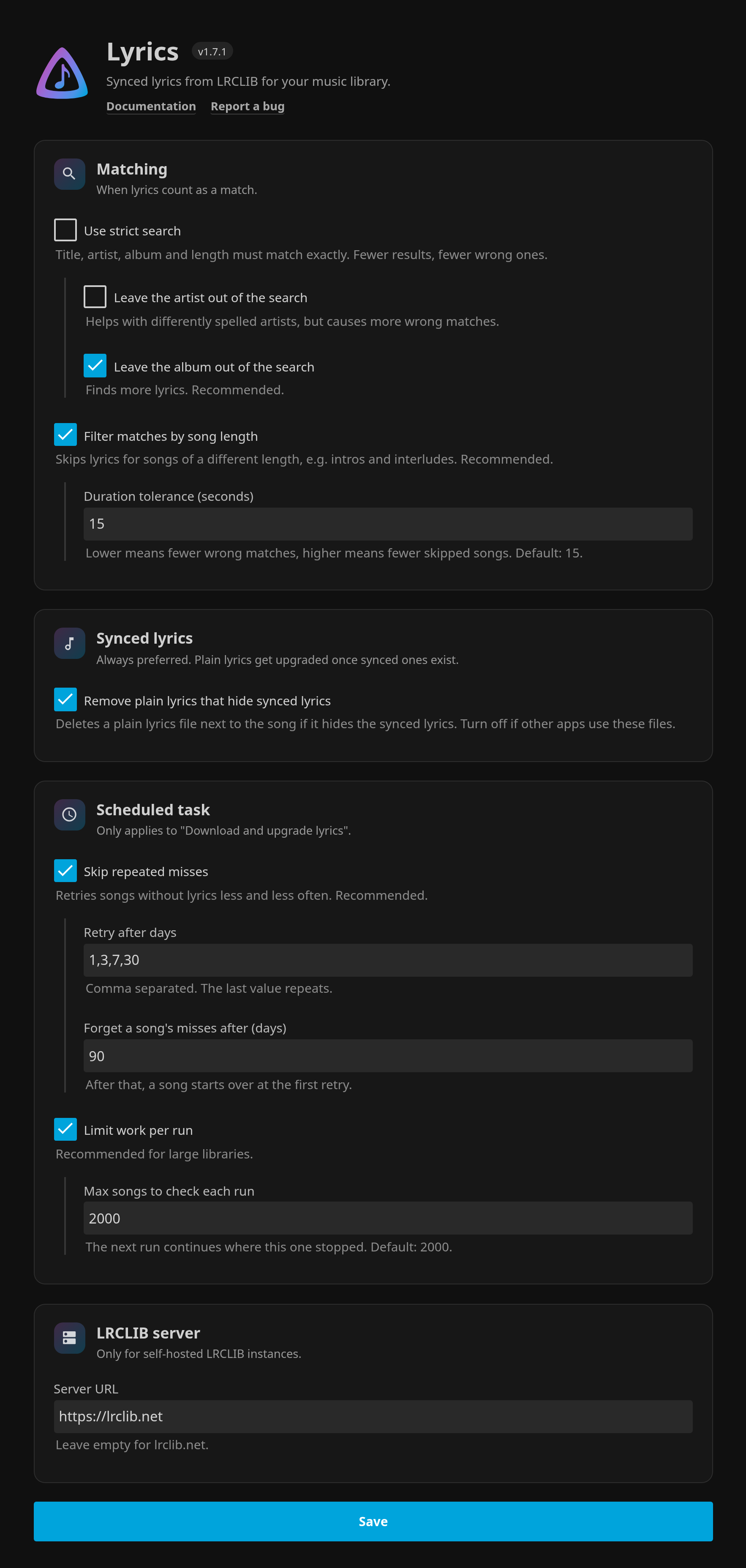
All settings are on one page under **Dashboard -> Plugins -> My Plugins -> Lyrics**:
---
## 🛠️ Troubleshooting
- **Plugin not appearing?**
-> Double check if your Jellyfin version is **10.11.0 or higher**
- **Lyrics not showing?**
-> Try to search for songs manually (right click on a song -> edit song text -> click on the search icon)
-> Try **refreshing metadata**
- **Missing lyrics for specific tracks?**
-> Manually refresh metadata (see below)
-> Toggle the `Use strict search` option in plugin settings
-> If a song with very long trailing silence or a remastered version is being skipped, increase `Duration tolerance (seconds)`
- **Wrong lyrics on instrumental / interlude tracks?**
-> The plugin filters matches by artist and by duration. If you still see wrong matches, **lower** `Duration tolerance (seconds)` (e.g. `5`) so only very close-duration matches are accepted.
-> If legitimate songs are being skipped instead, **raise** the value (e.g. `30`).
- **Scheduled task takes too long?**
-> Turn on `Skip repeated misses` (default on)
-> Turn on `Limit work per run` and reduce `Max songs to check each run`
-> Keep `Retry after days` on `1,3,7,30` unless you want faster/slower retries
- **Jellyfin shows plain lyrics although synced ones were downloaded?**
-> Turn on `Remove plain lyrics that hide synced lyrics` (default), or delete the plain `.txt` next to the song.
## 🔄 Manual Refresh
If lyrics aren't appearing for specific albums:
1. Navigate to the album
2. Right-click the album
3. Select **"Refresh metadata"**
---
## 🤝 Contributing
Contributions are welcome!
Feel free to open a **Pull Request**, or suggest new features / report bugs via an **Issue**.
---
## 📬 Support
👉 [Create an Issue](https://github.com/Felitendo/jellyfin-plugin-lyrics/issues)