
cachy-auto-update
Unattended background updates for CachyOS.
pacman, AUR, Flatpak and AppImages. In the background, with no password prompt.

## Install
```bash
paru -S cachy-auto-update
sudo cachy-auto-update enable
```
## How to use
```bash
sudo cachy-auto-update
```
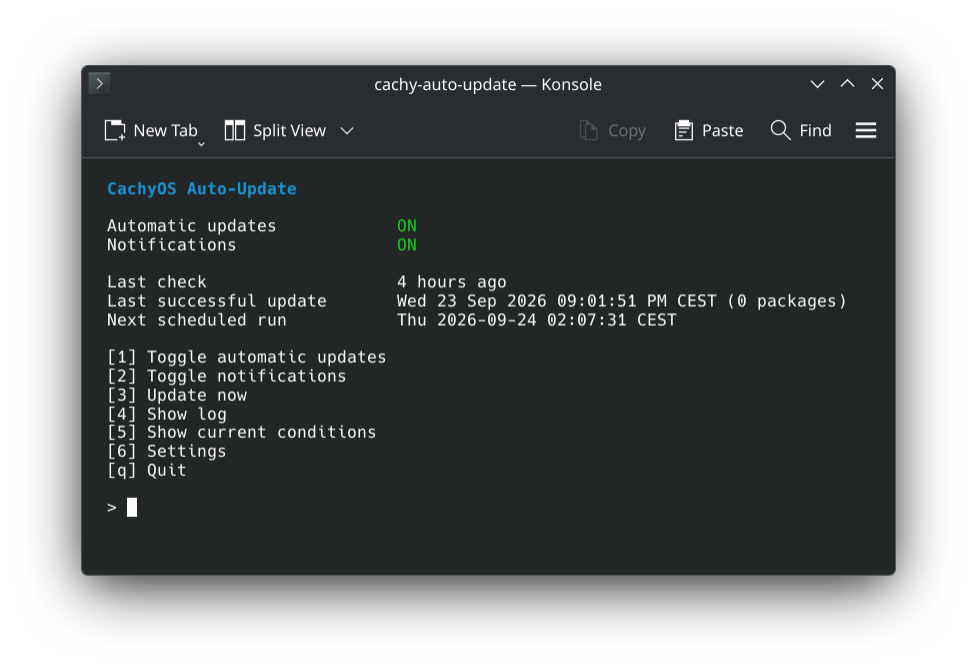
Press **1** to turn automatic updates on or off. **6** has all the settings.
## When does it update?
| | |
|---|---|
| Battery below 30 % | ⏸️ Waits (on power it runs) |
| A game is running | ⏸️ Waits |
| pacman, yay or paru is running | ⏸️ Waits |
| Shutdown or suspend during an update | 🚫 Blocked until it is done |
| Restart after an update | ❌ Never on its own, you get a notification |
## More
What it updates
| | |
|---|---|
| Packages | `pacman -Syu` |
| AUR | `paru` or `yay` |
| Flatpak | system and user installs |
| AppImages | through [Gear Lever](https://github.com/mijorus/gearlever) |
Safety
- A progress bar shows the step and the package.
- On Btrfs with snapper (the CachyOS default) every update gets a snapshot before and after.
- A lock file left by a power cut is removed on the next run.
- Package replacements are handled on their own. File conflicts are never overwritten.
- A signature error refreshes the keyring once and tries again.
Logs
```bash
cachy-auto-update log # last run
cachy-auto-update log -a # all runs
journalctl -u cachy-auto-update
```
cachy-update
[cachy-update](https://github.com/CachyOS/cachy-update) tells you about updates, you install them.
This installs them for you. Both work side by side, and `enable` offers to silence
cachy-update's notification.
Build from source
```bash
make && sudo make install
sudo systemd-sysusers && sudo systemd-tmpfiles --create
sudo cachy-auto-update enable
```
Optional: `pacman-contrib`, an AUR helper, `flatpak`, Gear Lever, `libnotify`, `python-gobject`.
GPL-3.0-or-later.