
middleclick-autoscroll
Middle-click autoscroll in every application that supports it.
Works with browsers, electron apps like discord and spotify, steam, and anything else that runs on chromium.

This tool looks at which of your apps run chromium under the hood and applies the necessary steps to get autoscrolling working (often just a feature flag). One install, one command and autoscroll _✨just works✨_ (like on windows).
## How to use
Just run `middleclick-autoscroll`. This will open the configuration TUI that looks like this:
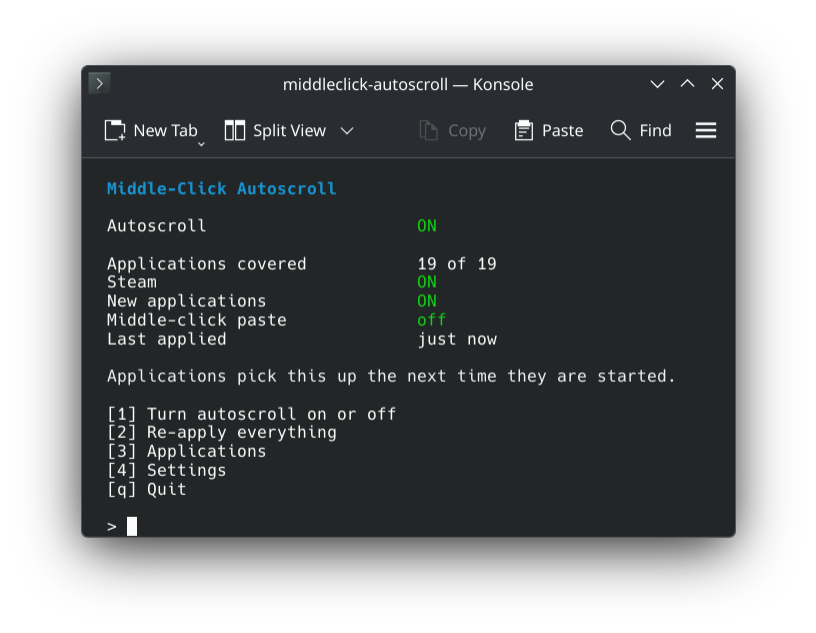
Normally you just need to press `[1]` and the magic is done.
Pressing `[3]` lets you see every app that was found and toggle each one individually.
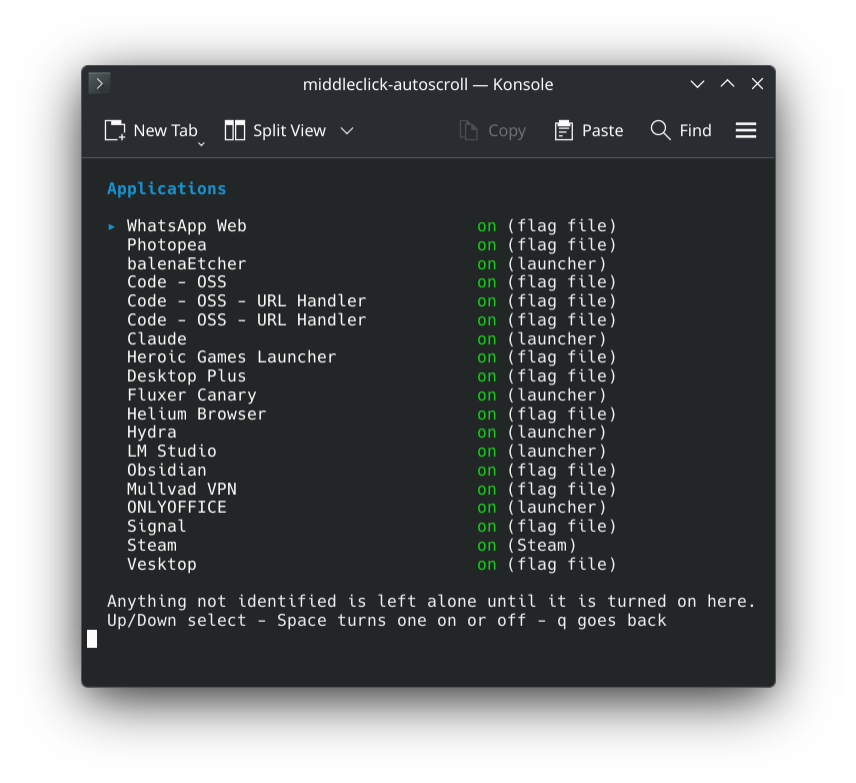
You can also press `[4]` for more settings.
## How to install
**Arch**
```bash
yay -S middleclick-autoscroll
```
**Fedora**
```bash
sudo curl -fsSL -o /etc/yum.repos.d/middleclick-autoscroll.repo \
https://loonixtools.github.io/middleclick-autoscroll/middleclick-autoscroll.repo
sudo dnf install middleclick-autoscroll
```
**Bazzite**
```bash
sudo curl -fsSL -o /etc/yum.repos.d/middleclick-autoscroll.repo \
https://loonixtools.github.io/middleclick-autoscroll/middleclick-autoscroll.repo
sudo rpm-ostree install middleclick-autoscroll
systemctl reboot
```
**Debian**
```bash
sudo install -d -m 0755 /etc/apt/keyrings
curl -fsSL https://loonixtools.github.io/middleclick-autoscroll/KEY.gpg \
| sudo gpg --dearmor -o /etc/apt/keyrings/middleclick-autoscroll.gpg
echo "deb [signed-by=/etc/apt/keyrings/middleclick-autoscroll.gpg] https://loonixtools.github.io/middleclick-autoscroll/deb ./" \
| sudo tee /etc/apt/sources.list.d/middleclick-autoscroll.list
sudo apt update && sudo apt install middleclick-autoscroll
```
**openSUSE**
```bash
sudo rpm --import https://loonixtools.github.io/middleclick-autoscroll/KEY.gpg
sudo zypper addrepo --gpgcheck --refresh \
https://loonixtools.github.io/middleclick-autoscroll/rpm middleclick-autoscroll
sudo zypper install middleclick-autoscroll
```
## How it works
Blink (the engine in Chromium, Electron, and CEF) already has autoscroll, but
it's off on Linux by default because middle click normally pastes the clipboard (??).
This flag turns it on:
--enable-blink-features=MiddleClickAutoscroll
But doing that for every app is kinda bothersome and it also might break with updates.
That's why I created this small tool to automate that.
Browsers get the same thing but this time without "blink":
--enable-features=MiddleClickAutoscroll
But both do the same ¯\_(ツ)_/¯
Except in Helium and Brave, which have their own names for it
(`HeliumMiddleClickAutoscroll`, and Brave's is actually spelled
`MiddelButtonClickAutoscroll`), so browsers get those as well.
New apps are picked up by a systemd path unit that watches the
relevant directories. If you hate systemd; `middleclick-autoscroll apply` does the
same thing manually.
AppImages get looked into as well. The payload is a squashfs image glued onto
the runtime, and squashfs keeps a small table with the name of every file in
there. So that table gets read and unpacked (a few kb, nothing is extracted
and the thing is never run) and the Chromium files are looked for in it. An
Electron AppImage is covered like any other app; a Tauri one is left alone,
because WebKitGTK simply has no autoscroll to switch on.
## Commands
| Command | |
|---|---|
| `middleclick-autoscroll` | Interactive menu |
| `… enable` | Turn on, apply, start watching |
| `… disable` | Undo everything |
| `… apply` | Apply to new apps |
| `… apply --rebuild` | Redo from scratch |
| `… status` | What's covered |
| `… list` | All apps and how they're handled |
## Building from source
```bash
make
sudo make install
```
Optionally needs `msgfmt` (gettext) for translations and `scdoc` for the man
page. Supports `PREFIX` and `DESTDIR`. `make check` runs syntax checks and
shellcheck.
See [packaging/README.md](packaging/README.md) for release builds and repo
signing.
## License
GPL-3.0-or-later.